
MONITOR · DIAGNOSE · REVIEW · KEEP BUSINESS MOVING
The Operations
Command Center
For Citrix and Azure Virtual Desktop Engineers
Follow user sessions, VDA health and the evidence behind a difficult launch.
CHOOSE YOUR WORKSPACE
Your platforms. Your context. One workspace.
WHY ENGINEERS CHOOSE IT-AUTOMATED
Faster investigations
Keep the session, its context and the next investigative step together.
Safer actions
Review supported changes, scope and permissions before acting.
Evidence-led troubleshooting
See available sources and collection gaps alongside your findings.
Better visibility
Follow users, sessions and infrastructure in a connected workspace.
Reduced console-hopping
Bring Citrix and Microsoft engineering workflows into one place.
POWERFUL CAPABILITIES FOR MODERN IT OPERATIONS
Built for the way you troubleshoot.
Find the session. Follow the evidence. Know what to investigate next.
01 / OPERATIONS
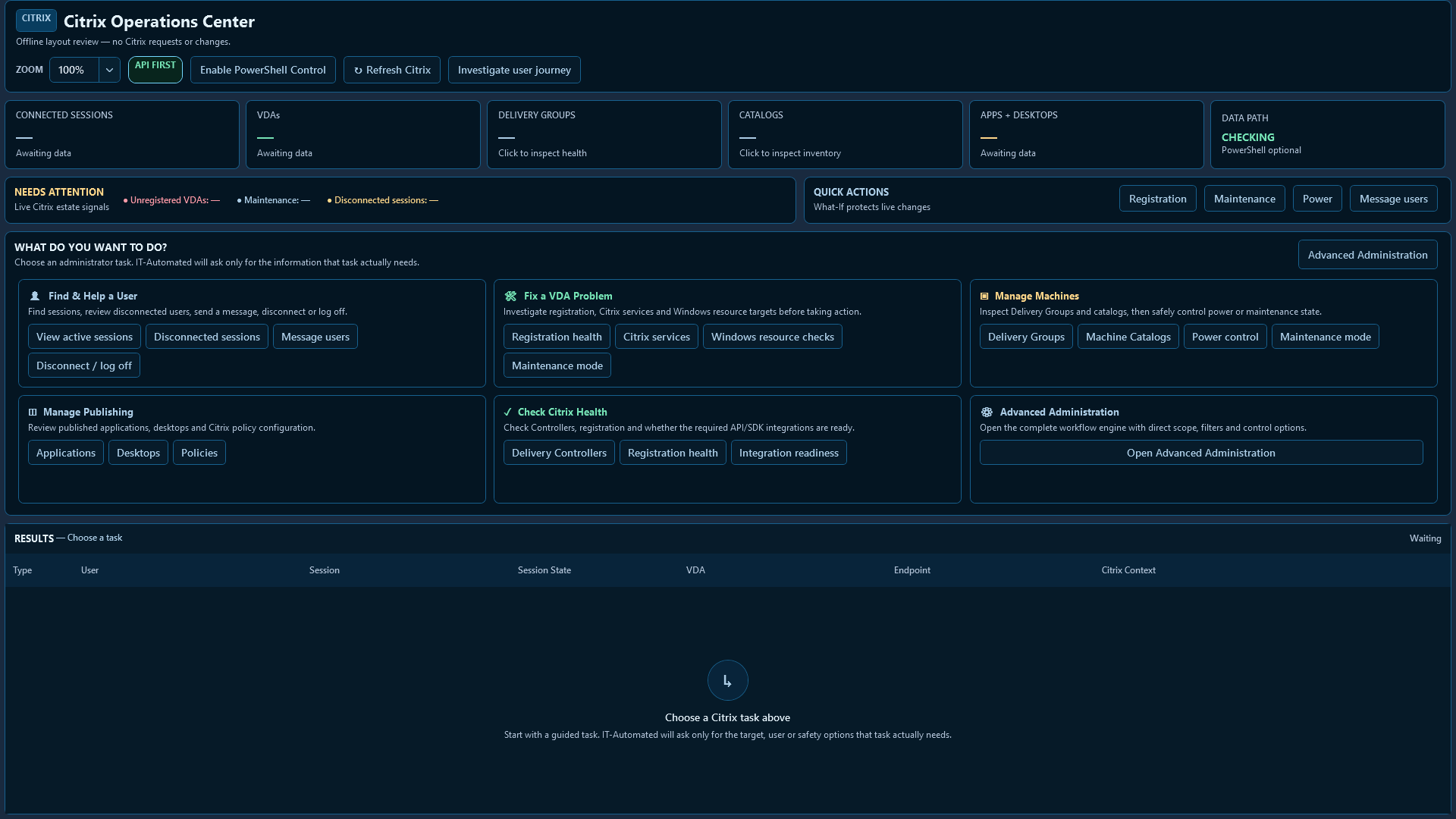
Operations Command Center
Connected sessions, VDAs, delivery groups and publishing. Follow task-oriented workflows with an explicit review step.
Explore Command Center 02 / USER EXPERIENCE
User Journey & Investigation Brief
Connect the user's symptoms to available evidence. See contributing factors, missing sources and the next safe check.
ILLUSTRATIVE WEBSITE DEMO · FICTIONAL DATA
Investigation Brief
Alex Morgan · DEMO-VDA-01
“My desktop takes longer to become usable.”
Interactive Ready accounts for 10.80 s in this sample logon. A contributing stage is not a proven root cause.
Endpoint timing and user-correlated Windows events are unavailable. No healthy result is inferred.
Review the user's launch window, then collect the missing endpoint and Windows evidence before considering a change.
03 / LOGON JOURNEY
Citrix Logon Journey
Twelve stages. Measured timings. Visible evidence gaps. Investigate where time accumulated before drawing conclusions.
Explore Logon JourneyBUILT FOR YOUR ENVIRONMENT
Adapts to your role. Fits your environment.
Citrix or Azure Virtual Desktop: the relevant tools, context and workflows, in one consistent experience.
Citrix Engineer
- Citrix Operations Center
- User investigations & 12-stage logon journey
- VDA registration, delivery groups & publishing
- Evidence-led diagnostics & reviewed actions
AVD Engineer
- Workspace, host-pool & session-host inventory
- User sessions & experience investigation
- Image & deployment workflow interfaces
- Configured Azure scope and permissions required
READY TO SIMPLIFY YOUR OPERATIONS?
See IT-Automated in action.
Explore the workspace built for Citrix and Azure Virtual Desktop engineers.
Personalise your engineer workspace · Hybrid / EUC and Windows & Identity
WORKSPACE BUILDER / INTERACTIVE PREVIEW
Your role. Your challenges.
Your view of IT-Automated.
Choose how you work and what matters most. The product walkthrough adapts instantly, using real 0.30.0 interface captures and relevant administration workflows.
Citrix Engineer workspace
Sessions and user support, first.
Review Citrix sessions, VDAs and delivery context before moving into deeper evidence-based investigation.
Personalized website preview only. Recommendations are selected locally from your choices; no AI service or live estate connection is used. The installed dashboard remains unchanged.
YOUR ASSEMBLED WORKSPACE
Panels chosen for how you work.
Each selection adds a relevant workspace module. Click a real application capture to inspect it in full size.
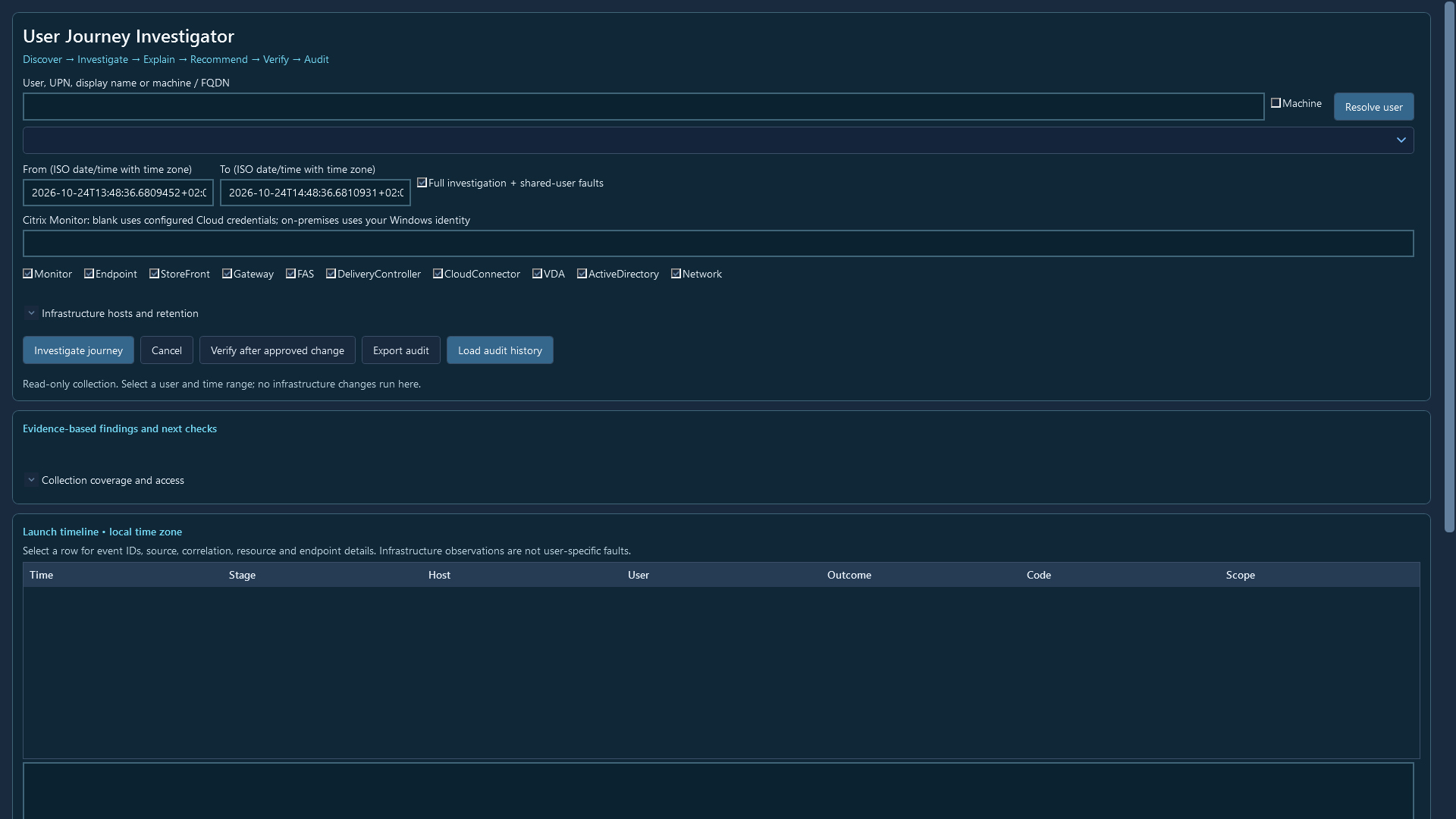
User Journey Investigator
Follow logon evidence and discover missing sources.
Explore this workflow →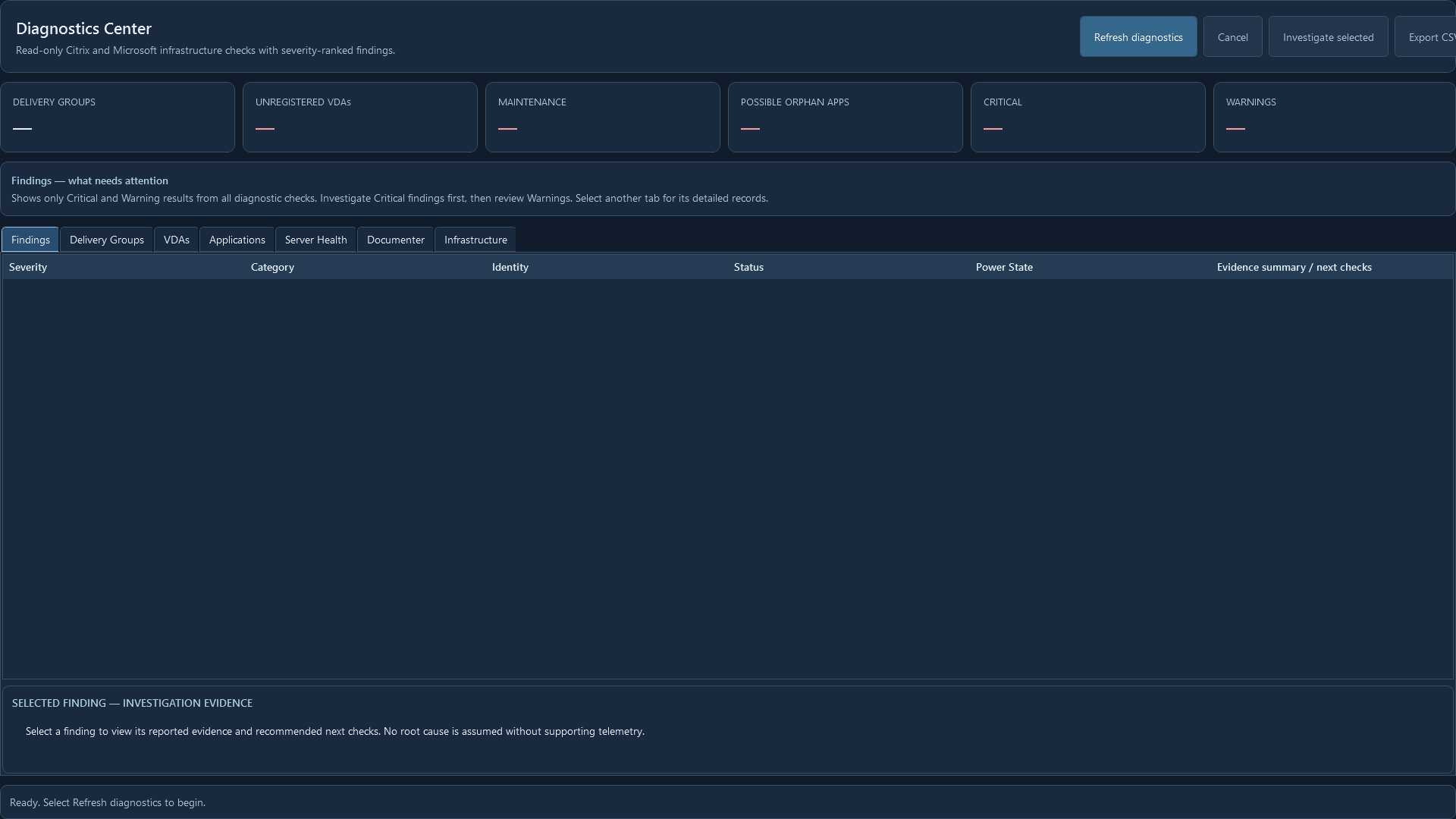
Infrastructure diagnostics
Review source-backed registration and health findings.
Explore this workflow →CHOOSE THE RIGHT INSTALLER
The website edition is the recommended download.
The direct website installer includes prerequisite and plugin checks and supported SDK setup assistance. Microsoft Store is a secondary installation route.
This site previews the 0.30.0 interface. The preview does not mean 0.30.0 has been released for download. The download page identifies the currently approved installer version.
View the approved download and installation guidance →